
Personal content channels
Maintain your own voice in content prepared in advance.
VOICE CLONING WITH CONSENT
Clone an AI voice from audio you have permission to use. Create and manage voice profiles for authorized content in HOTX AI.
Upload only your own recordings or material the voice owner has authorized you to use.
Upload a sample, confirm permission and track status after signing in.
Do not use voice samples without appropriate consent.ACTUAL WORKSPACE
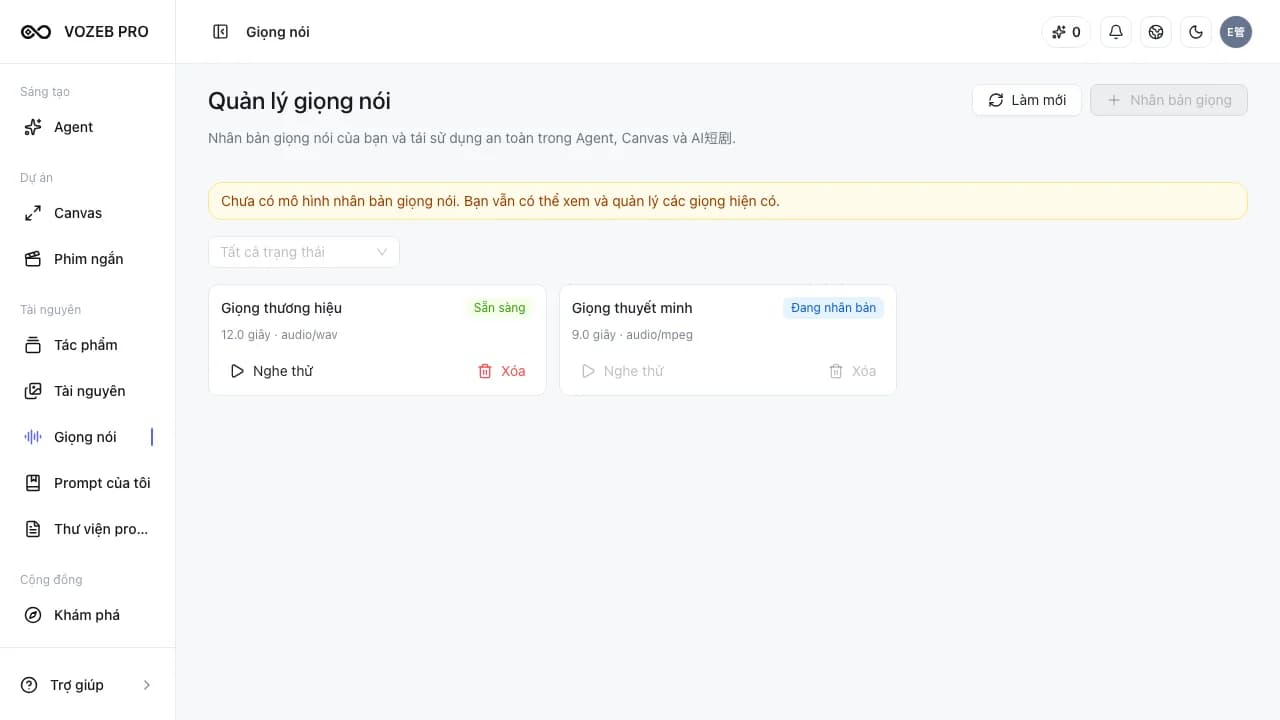
The workspace shows processing status and provides the controls needed to manage your voice profiles.
USE CASES
Custom voice profiles suit workflows with explicit consent and repeated use.
Maintain your own voice in content prepared in advance.
Create consistent narration for material your organization is authorized to produce.
Manage a representative's voice profile with appropriate consent.
Choose a ready profile as the voice input for new content.
HOW TO USE
Source recordings, permission confirmation and resulting profiles have distinct steps.
Choose a clear audio file you have permission to use for creating a voice profile.
Confirm the sample belongs to you or has been authorized by the voice owner.
The profile displays its status so you know when it is ready to preview.
Preview, rename, delete or select the profile for a speech generation task.
AVAILABLE CAPABILITIES
This landing page opens the existing management area; cloning takes place in the workspace.
Submit source audio in the voice profile management area after signing in.
Confirm usage rights before creating a voice profile.
Follow processing and listen to the profile when it is ready.
Manage display names or remove profiles you no longer need.
FREQUENTLY ASKED QUESTIONS
Upload authorized audio, confirm consent and wait for processing into a voice profile. The workspace shows status before the profile can be previewed or used.
Only with appropriate consent and usage rights from the voice owner. Do not upload unauthorized recordings or use them for impersonation.
Yes. The management area supports previews of ready profiles and lets you rename or delete your account's profiles.
A ready profile can be selected for audio generation when the active capability supports it.
RELATED TOOLS
GET STARTED WITH HOTX AI
Sign in to upload a sample, confirm permission and manage profiles in your private workspace.